Jump to the following sections of this article
Lainey’s Introduction
At the 2026 M-Enabling Summit this year, I met the authors of this guest article when we were panelists for a 3-hour seminar titled “ADA Title II Digital Access: From Requirements to Real Implementation.”
I was there to talk about how digital accessibility ethics and the collaborative strategies of Structured Negotiation can help advocates in the run-up to the April 2027 deadline for the new technical standards for websites and mobile applications of state and local governments in the United States.
Alison Walden and Matt Vitale (read their bios at the end of this article) were there to talk about their research into accessibility of state government websites. While I know research is a critical component of accessibility, I’ve never been involved in accessibility research and to be honest, I was expecting a somewhat dry explanation of Matt and Alison’s findings, whatever they were.
I was so wrong! They gave a great presentation, and I learned a lot about things I probably should have known already. I’m so glad they said “yes!” when I asked if they could write up their findings about web accessibility overlays for the LFLegal website.
(Visit the Overlay Topic page on this website for short summaries and links to other articles about web accessibility overlays, a technology I consider to be a global threat to ethical disability inclusion in tech. You can also learn more about overlays in Chapter 17, titled Accessibility Overlays and the Harms of Marketing “Quick Fixes,” in Digital Accessibility Ethics: Disability Inclusion in All Things Tech.)
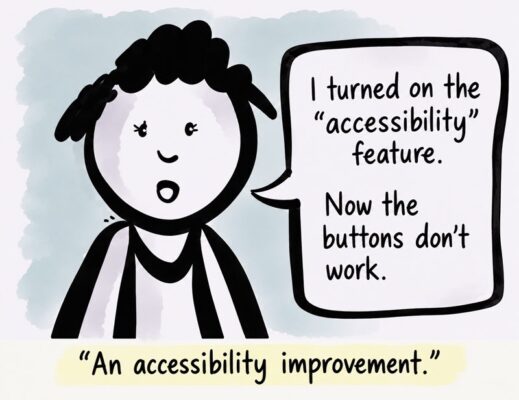
Thank you Alison and Matt for your work and this article, and to Alison for drawing the image above. It shows a cartoon person saying, “I turned on the ‘accessibility’ feature. Now the buttons don’t work.” A caption below reads, “An accessibility improvement.” The cartoon illustrates how tools intended to improve accessibility can sometimes create new barriers.
share on linkedinshare on bluesky
Why Accessibility Overlays Don’t Work: Findings from U.S. State Government Websites
In 2025, we studied the accessibility of U.S. state government websites. We checked how well each website met accessibility standards and functioned with assistive technologies such as screen readers. We found that although many sites included basic accessibility features, significant barriers still exist that could prevent people with disabilities from completing common tasks. We shared our findings in an International Association of Accessibility Professionals (IAAP) webinar on March 24, 2026 and at the 2026 M-Enabling Summit.
During our research, we found that some state websites employed tools called accessibility overlays. These tools claim to make websites accessible to people with disabilities, often without changing the website’s underlying code. Overlay companies have faced criticism for making claims they cannot support, so we wanted to find out whether these tools actually made state government websites more accessible.
First, let’s look at some of the common accessibility problems we found:
- Navigation menus and other important functions often did not work properly with keyboards (without a mouse) or screen readers.
- Link labels were unclear, and form fields had missing or incorrect labels.
- Important information was sometimes available only in inaccessible PDFs.
How are accessibility overlays supposed to help?
Overlays usually appear as a small icon in the corner of a webpage. Selecting the icon opens a menu of tools for changing text size, adjusting colors, or changing how content appears. They are typically licensed with the claim that these features can help make a webpage’s content or functionality more accessible.
At the time of our research, most states were not relying on accessibility overlays. Only seven states were using overlays from five different companies.
We examined a selection of overlay features to determine whether they could address the accessibility problems we identified. Here are some examples:
- Low vision support: Most overlays offered features that claimed to improve text clarity and contrast. On one website, we measured text contrast before and after turning on this overlay feature. Although the text became larger and sometimes bolded, its contrast against the background often decreased. The larger text also often grew to cover other website controls, making some features difficult or impossible to use. Even the overlay’s own text became harder to read when we turned on this feature.
- Seizure safety: Many overlays claimed to reduce motion on a website that could trigger seizures. On one state website, turning on this feature stopped an automatic carousel from moving, but also completely broke the carousel’s functionality, preventing users from moving through the content manually. The website already had a pause button that could stop the motion without breaking the functionality. The overlay’s feature made things worse.
- ADHD support: One overlay offered a screen mask that highlighted part of the page while hiding the rest to minimize distractions. When we turned this feature on, some website buttons stopped working. Turning on this feature did nothing to stop distracting hover animations on the website, which continued as before.
- Cognitive support: One overlay feature added colored boxes around headings and links. Rather than making the page easier to understand, turning on this feature increased visual clutter. The website without the overlay used heading tags incorrectly, so the boxes did not accurately show the page’s structure. This was a perfect example of how an overlay’s functionality cannot fix a website that has been developed in an inaccessible way.
- Simplify page: One overlay’s “simplify page” feature removed so much content that the page became nearly useless. For example, turning on this feature kept the text of links but removed the link functionality. Users could read the link text but could no longer use it to navigate.
- Legible fonts: When individual letters within a font resemble each other so much that some readers have difficulty distinguishing them, this is called “character ambiguity.” One overlay’s “legible fonts” feature replaced the website’s Open Sans font with Arial, even though Open Sans has less character ambiguity than Arial. If the goal was to improve legibility, Verdana would have been a better choice. Verdana was designed for reading on screens, with distinct letter shapes that help reduce confusion. Simply replacing Open Sans with Arial offered no clear accessibility benefit.
- Keyboard navigation and screen reader support: On websites with existing keyboard and screen reader problems, turning on these features produced no noticeable improvement. The barriers were still there.
- Profiling: One overlay asked users to choose a disability profile so it could apply suitable accessibility features. When I selected the “blind” profile, the overlay started reading the page aloud, even though my screen reader was already running. Rather than helping me use my existing technology, it added another voice.
We found that some overlays allowed only one feature to be turned on at a time. If you needed both seizure safety and low vision support, for example, you had to choose one or the other. One overlay could not even be accessed using a keyboard alone.
At best, overlays duplicate features already available in browsers, operating systems, and assistive technologies. They offer alternate versions of familiar tools that users must learn again. People who rely on assistive technology typically already have tools that work for them. They are not browsing the web in hopes that a site provides an overlay.
At worst, overlays can create new accessibility barriers. Some of the overlays we encountered were not accessible themselves, making them unusable by some of the very people they were supposedly meant to help. Others broke existing website functionality, making content harder or sometimes impossible to navigate.
The problems overlays don’t solve
Perhaps most importantly, the overlays did not address the most common accessibility problems we found on state government websites. They didn’t fix broken keyboard navigation, make unclear links more descriptive, add missing labels to form fields, or make inaccessible PDFs accessible.
Even if every overlay feature had worked exactly as promised, these problems would still have remained. The features simply weren’t designed to address them.
Some overlays even introduced new barriers. Yet website owners pay for these tools, often believing they are making their websites more accessible.
Update: One year later
When we checked the websites again in October 2026, only five of the original seven states were still using overlays. We found no evidence that other states had started using them.
We hope this decline reflects a growing understanding that adding an overlay cannot make an inaccessible website accessible.
Our wider research showed that improving digital accessibility takes more than fixing individual problems on a website. Accessibility needs to be part of the entire process, from planning and design to content creation and development. Having an accessibility specialist on or working alongside the team helps make sure accessibility is considered and implemented throughout the process, rather than only after the website is built. Having people with disabilities sharing both lived experience and accessibility expertise is a crucial investment in sustainable, ethical accessibility.
Instead of spending money on overlays that promise a quick fix, state governments should invest in the people, including disabled people, skills, and processes needed to build accessible websites and digital services from the start.
About Alison Walden and Matt Vitale
Alison Walden is Vice President of Technology and Global Accessibility Lead at Publicis Sapient. She leads the company’s Accessibility Centre of Excellence and North American Experience Engineering team, where she has built the systems and governance structures that make accessibility an integrated part of digital delivery. Alison’s work focuses on helping large organizations move beyond one-off audits toward sustainable accessibility operations that embed inclusive design and testing into everyday workflows. She has led major accessibility programs across public and private sectors, including research assessing the accessibility of all 50 U.S. state government websites. In 2024, Alison received the IAAP Impact Award for her leadership in advancing accessibility at scale.
Matt Vitale is a Manager of Experience Engineering at Publicis Sapient, specializing in accessibility strategy and implementation for public-sector digital ecosystems. Matt plays a lead role in developing accessibility-focused design systems, improving content governance practices, and integrating accessibility testing into delivery pipelines. Previously, Matt served as a Senior Accessibility Consultant for the U.S. Department of Education’s Office for Civil Rights (OCR), where he supported the National Digital Access Team. In this role, he trained attorneys to investigate digital access complaints under Section 504 and 508 and helped OCR resolve over 1,000 digital access complaints across schools, districts, and state agencies nationwide. Matt began his career in Blind Rehabilitation at the Department of Veterans Affairs, which continues to ground his approach in real user experience.